Choosing between Apple and Samsung in 2026 can feel overwhelming because both ecosystems are mature, fast, and packed with premium features. If you’re searching iphone vs samsung which is better in 2026, you probably don’t want a “fan war” answer—you want a clear decision based on your real daily needs: camera, battery, performance, AI features, apps, privacy, resale value, repair options, and the devices you already own.
This guide compares iPhone and Samsung Galaxy phones in a practical, user-first way. You’ll get a category-by-category breakdown, a decision table, recommendations for different types of users (students, creators, business, gamers), and switching tips so you can buy confidently.
Table of Contents
Value of This Article
This article is built to help you make a smart 2026 purchase decision without marketing noise. Instead of repeating generic claims (“Android is customizable” or “iPhone is smooth”), you’ll get:
- A clear, category-based comparison that explains who benefits from each advantage.
- A practical decision framework so you can choose quickly and confidently.
- Real-world tradeoffs (battery habits, camera consistency vs flexibility, ecosystem lock-in, repair and resale).
- Switching tips so your choice doesn’t feel risky.
Quick verdict: iPhone vs Samsung in 2026
If you want a fast summary before the details, here’s the most accurate way to think about it:
- iPhone is often better if you want a tightly integrated Apple ecosystem (Mac, iPad, Apple Watch), consistent long-term experience, and you prefer fewer settings with strong default behavior.
- Samsung is often better if you want more device choices (including foldables), deeper customization, stronger multitasking tools, and flexibility with Windows/Google services and file management.
In other words, iphone vs samsung which is better 2026 isn’t one universal answer—it depends on what you value most.
What’s different in 2026 (why the comparison matters now)
The “iPhone vs Samsung” conversation has changed in the last few years. In 2026, these trends shape the decision more than raw CPU speed:
- AI features are mainstream: summarizing, rewriting, photo cleanup, voice tools, and on-device intelligence now influence daily convenience.
- Form factors matter: Samsung’s foldables offer a different lifestyle experience than traditional slab phones.
- Charging and heat management matter: fast charging, battery protection features, and thermal behavior affect long-term battery health.
- Ecosystem lock-in is stronger: your laptop, tablet, watch, and earbuds now heavily shape what feels “best.”
How to choose in 5 minutes (decision framework)
Use these four questions to decide quickly:
1) What devices do you already own?
- If you own a Mac + iPad + Apple Watch, iPhone usually gives the most seamless experience.
- If you use Windows and Google services heavily, Samsung often feels more natural and flexible.
2) What “camera quality” means to you?
- If you want consistent results with minimal effort (quick photos, reliable video), iPhone is a strong choice.
- If you want more flexibility (zoom options, shooting modes, customization), Samsung often shines—model dependent.
3) Do you multitask on your phone?
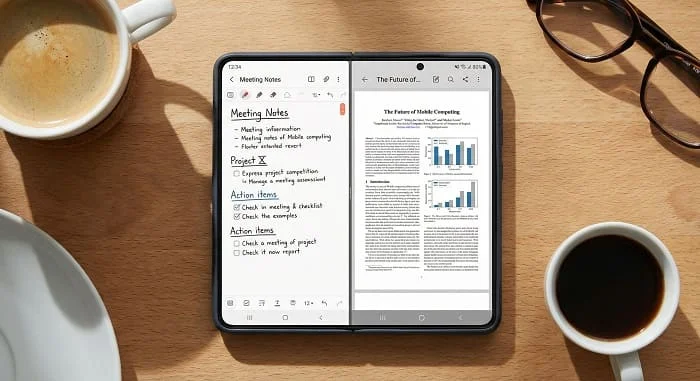
- If you frequently split-screen notes + browser + messages, Samsung’s multitasking tools can be a major advantage.
- If you mostly use one app at a time, you may not benefit as much from multitasking features.
4) Do you prefer “simple by default” or “control and customization”?
- Simple by default: iPhone
- Control and customization: Samsung
iPhone vs Samsung comparison table (2026)
| Category | iPhone (Apple) | Samsung Galaxy | Who benefits most |
|---|---|---|---|
| Device choices | Focused lineup, fewer form factors | Wide range + foldables | Users who want variety and form-factor options |
| Multitasking | Good, but more limited on iPhone | Strong split screen + pop-up windows | Students, power users, business workflows |
| Customization | More controlled | Deeper customization in One UI | Users who like tailoring UI and workflows |
| Cameras | Consistent results; strong video | Flexible modes/zoom (model-dependent) | iPhone: quick creators; Samsung: experimenters |
| Charging | Solid; varies by model and charger | Often faster wired options (model-dependent) | Heavy users who need fast top-ups |
| Ecosystem | Best with Apple devices | Strong with Windows/Google flexibility | Depends on your laptop/tablet/watch |
| Resale value | Often strong | Varies by model/region | Buyers who upgrade frequently |
1) Design & display experience
Both iPhone and Samsung flagships have premium build quality in 2026, so the “better” question is about comfort and use cases:
Where iPhone often feels better
- Consistency across the lineup: the experience is similar across models, which makes switching between iPhones easier.
- Color tuning consistency: many people like Apple’s predictable look across photos and apps.
Where Samsung often feels better
- Display variety: more options in size, shape, and form factor (including foldables).
- High-brightness outdoor usability: many Galaxy models are extremely readable in sunlight.
- Preference flexibility: settings for display comfort, refresh behavior, and interface layout can be more adjustable.
Practical advice: If possible, view both in bright light. Outdoor readability and how the screen feels during long reading sessions often matter more than spec numbers.
2) Performance and on-device AI features
Raw performance is excellent on both sides in 2026. Most people won’t “max out” either phone with normal use. The real difference is how performance is used for AI, photos, and multitasking.
Performance in daily life
- iPhone: typically feels smooth with a controlled OS environment, which helps consistency.
- Samsung: typically feels fast, and its advantage shows when you push multitasking, split-screen, or customization-heavy workflows.
AI in daily use (the part that actually matters)
When comparing AI, don’t focus only on hype. Ask:
- Does it help you write and summarize faster?
- Does it help you organize notes, messages, and reminders?
- Does it improve photos (cleanup, selection, edits) in a way you actually use?
- Does it run on-device for privacy, or require cloud processing for everything?
In practice, both platforms are strong. “Better” depends on what features you use daily and how well they integrate with your apps and habits.
3) Cameras and video: what “better” actually means
Camera comparisons often get reduced to “which is best,” but your results depend on how you shoot.
iPhone strengths (typical user experience)
- Consistency: reliable results with minimal tweaking.
- Video workflow: iPhone is often a favorite for quick, consistent video capture and editing pipelines.
Samsung strengths (typical user experience)
- Flexibility: strong zoom options on certain models and more shooting modes.
- Creative control: manual/pro features can be easier to access depending on the device.
A simple way to choose
- If you mostly shoot people, family, quick trips, social video: iPhone consistency is a big advantage.
- If you shoot travel, events, long-distance subjects, or you like experimenting: Samsung flexibility can win.
Tip: Don’t judge only by daytime photos. Test low light, indoor lighting, and motion (kids/pets). That’s where differences become obvious.
4) Battery life and charging habits
Battery life depends on your signal strength, screen brightness, usage, and battery health. But there are platform-level differences that matter in 2026:
Where iPhone often wins
- Efficiency: strong standby behavior and consistent power management for many users.
- Predictability: less “random drain” if you keep the app environment clean.
Where Samsung often wins
- Charging speed options: many Galaxy models support faster wired charging than many iPhones (model and charger dependent).
- Battery protection controls: features that help limit charging stress can be easier to find and tune.
Real-life conclusion: If you’re a heavy user, faster top-ups can matter more than a small difference in average screen-on time.
5) Software updates, long-term support, and stability
Long-term support matters if you keep your phone for 3–6 years.
iPhone update strengths
- Apple controls hardware and software tightly, which often results in strong long-term consistency.
- Updates are usually available to supported models at the same time worldwide.
Samsung update strengths
- Samsung has improved long-term support significantly in recent years across many models (exact policy varies by device line and region).
- One UI adds productivity features and customization options that many users prefer.
Practical advice: Always check the update commitment for the exact model you want—not just the brand—because mid-range and flagship support can differ.
6) Customization and productivity
This is one of the biggest day-to-day separators in 2026.
Samsung productivity advantages (common examples)
- Split-screen and pop-up windows for real multitasking.
- More control over notifications, app behavior, and home screen layout.
- Samsung DeX on supported models for a desktop-like experience (useful for light work).
- S Pen support on specific models (note-taking, PDF annotation, precise edits).
iPhone productivity advantages (common examples)
- A simple, consistent workflow that many people find faster because there are fewer choices to manage.
- Strong continuity when paired with other Apple devices (handoff-style convenience, ecosystem workflows).
If you love controlling your phone’s behavior and you multitask often, Samsung tends to feel more “tool-like.” If you prefer simplicity, iPhone can feel more “frictionless.”
7) Ecosystem: Mac/iPad/Watch vs Windows/Android flexibility
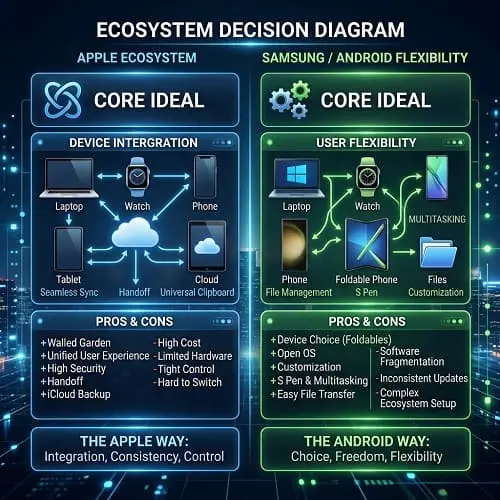
In 2026, ecosystems decide “better” more than cameras do.
If you’re already in the Apple ecosystem
iPhone becomes the “center” that connects smoothly with Apple Watch, Mac, iPad, and Apple services. If your household and workflow rely on that, switching away can feel like losing convenience features—even if the Samsung hardware is excellent.
If you’re in a mixed ecosystem (Windows + Google services)
Samsung can feel more natural because Android works flexibly with Google services and a wide range of third-party apps and accessories. Many users also prefer Samsung’s approach to file handling and cross-platform workflows.
Takeaway: If your laptop is a Mac and your watch is an Apple Watch, iPhone usually makes more sense. If your laptop is Windows and you prefer flexibility, Samsung often feels better day to day.
8) Privacy and security
Both Apple and Samsung take security seriously, but they communicate it differently and approach ecosystem control differently.
Apple’s typical strengths
- Strong privacy branding and a controlled app environment.
- Clear, consistent OS-level privacy settings for many users.
Samsung’s typical strengths
- Strong security platform options for enterprise use cases.
- Powerful controls, especially for users who want deeper management.
For an official Samsung security platform overview, you can reference: Samsung Knox (official site).
Practical advice: Your security outcome depends heavily on your habits: updating regularly, avoiding sketchy apps, using 2FA, and not reusing passwords.
9) Apps, games, and creator workflows
Both platforms have strong apps in 2026, but the experience can differ depending on what you do most.
Gaming
- iPhone: very consistent performance and predictable thermal behavior in many titles.
- Samsung: excellent performance, plus more control over performance modes and background behavior (varies by model).
Content creation
- iPhone: often preferred for quick social video workflows due to consistency and editing pipelines.
- Samsung: can be excellent for creators who want shooting flexibility (zoom, modes, manual options) and file workflows.
Students and productivity users
Samsung tends to win for multitasking and note workflows, especially if you combine split-screen with a notes app, browser, and PDF viewer. iPhone tends to win for simple “one app at a time” use with strong ecosystem convenience.
10) Repair, resale value, and cost of ownership
Buying the phone is only part of the cost. In 2026, consider:
Resale value
- iPhones often maintain strong resale value in many markets.
- Samsung resale value can vary more depending on model, local demand, and how quickly new models appear.
Repair considerations
- Repair pricing depends on the exact model and region (screen replacements are expensive on both).
- Foldables may have different repair considerations compared to slab phones.
Best cost-of-ownership strategy (works for both)
- Use a quality case and screen protector.
- Keep the battery healthy (avoid constant heat while charging).
- Buy for your “real” needs so you don’t upgrade too soon.
Which one should you buy? (profiles)
Choose iPhone in 2026 if you are:
- Deep in Apple ecosystem (Mac/iPad/Apple Watch) and want maximum seamless integration.
- Someone who values a consistent, controlled experience with fewer choices to manage.
- A creator who wants predictable video workflows and reliable results with minimal tweaking.
- A frequent upgrader who cares about strong resale value (market-dependent).
Choose Samsung in 2026 if you are:
- A power user who wants multitasking, customization, and control over how the phone behaves.
- A student or professional who benefits from split-screen, pop-up windows, DeX, or S Pen (on supported models).
- Someone who wants more hardware options—including foldables—or better value in mid-range models.
- A Windows + Google services user who prefers flexibility and file workflow freedom.
Switching tips (Android ↔ iPhone) without losing your data
Switching is easier in 2026 than it used to be, but the process is smoother when you prepare.
If you’re moving from Android/Samsung to iPhone
- Back up Google Photos/Drive, contacts, and important files.
- Be ready to move WhatsApp/chat backups according to the app’s official method.
- Use Apple’s official guidance for moving data when possible.
Official Apple reference: Apple Support: Move from Android to iPhone
If you’re moving from iPhone to Samsung
- Make sure you can sign out of iCloud and have access to your Apple ID.
- Export contacts and ensure your photos are backed up.
- Plan for iMessage deactivation if needed in your region/carrier setup.
Technician tip: Before you switch, write down your critical logins (Apple ID / Google account) and make sure your 2FA method is accessible. Most “switching disasters” are account access problems, not phone problems.
Related reading
If you want a Samsung-focused breakdown of advantages and use cases, read: 10 reasons why samsung is better than iphone
FAQ
iphone vs samsung which is better 2026 for students?
Many students prefer Samsung for split-screen multitasking and note workflows (especially on models with S Pen support). iPhone can be better if you already use a Mac/iPad/Apple Watch ecosystem for school and prefer simplicity.
Which is better for battery life in 2026?
It depends heavily on your usage and the exact model. iPhone is often very efficient, while Samsung often offers faster charging options on many models. Consider your daily routine: do you need long endurance, or quick top-ups?
Which is better for cameras in 2026?
Both are excellent. iPhone often wins for consistency and video workflow. Samsung often wins for flexibility (zoom and modes) depending on the model. The “best” camera is the one that matches how you shoot.
Is it worth switching ecosystems?
If your current phone frustrates you daily (multitasking limits, file workflow, ecosystem mismatch), switching can be worth it. If you’re mostly happy and only chasing small improvements, upgrading within your current ecosystem is often simpler.
What matters more than brand?
The exact model and your use case. A flagship vs mid-range comparison can completely change the outcome. Always compare the specific devices in your budget.
Final checklist
- List your top 3 priorities (camera, battery, multitasking, ecosystem, price).
- Check which ecosystem you’re already invested in (Mac/Watch vs Windows/Google).
- Decide if you want “simple by default” (iPhone) or “control and flexibility” (Samsung).
- Compare exact models in your budget (not just brand names).
- Consider long-term value: updates, resale, repair options in your region.
The best answer to iphone vs samsung which is better in 2026 is the one that fits your habits. iPhone is often best for ecosystem consistency and simplicity; Samsung is often best for choice, multitasking, and customization. Use the framework above and you’ll pick the right phone for your daily life—not someone else’s.

About the Author
Alex Carter — Founder & Editor‑in‑Chief, GicraMobile
Alex leads GicraMobile’s testing lab and reviews. His methodology focuses on day‑to‑day performance, battery health and thermals, camera consistency, and 5G/LTE reliability—so you can pick the right phone without hype.
Real‑world testing: 90–120 Hz smoothness, idle drain, thermals
Camera checks: HDR, skin tones, low‑light stabilization
Connectivity: band fit, eSIM, VoLTE/VoWiFi, Wi‑Fi performance
You may also like this