This page will be updated as soon as Apple publishes official charging specifications for iPhone 18.
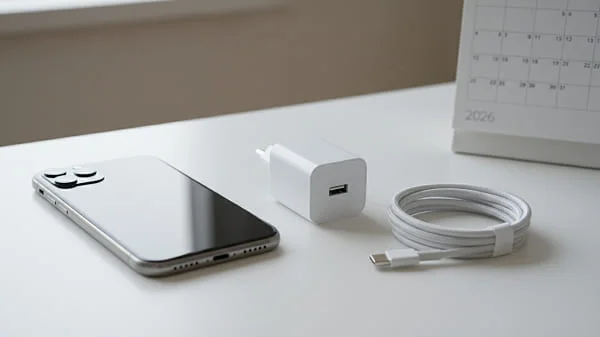
If you’re researching the 2026 iphone 18 charger, this deep, practical guide is for you. We explain what’s safe to expect based on Apple’s recent generations (USB‑C, USB Power Delivery, MagSafe), how to pick the right wattage, which cables are truly “fast‑charge ready,” how to avoid battery wear, and how to build a reliable home/desk/car setup. We’ll also cover wireless charging, travel tips, troubleshooting slow or failed charging, and best practices for long‑term battery health—all while staying grounded in Apple’s publicly documented behavior and avoiding wild speculation.
Table of Contents
What We Can Confirm vs. What to Expect
Apple transitioned iPhone to USB‑C with recent models and relies on USB Power Delivery (USB‑PD) for safe, negotiated fast charging. That shift simplified accessories: one modern USB‑C charger can power your iPhone, iPad, and most MacBooks, adjusting power output automatically.
For the 2026 cycle and iPhone 18, the safest assumptions—until Apple confirms official specs—are:
- USB‑C port: Expect continued USB‑C compatibility for charging and accessories.
- USB‑PD fast charge: Expect PD‑based fast charging similar to recent iPhones. Higher‑wattage chargers won’t “force” extra power; they simply offer headroom, and the iPhone negotiates what it can safely draw.
- Wireless charging: MagSafe remains the premium, magnet‑aligned experience on iPhone, with Qi standards increasingly aligning around the MagSafe‑style ring for better placement and efficiency.
We’ll update this guide with exact wattage behavior and any protocol changes (e.g., PD profiles/PPS nuances) once Apple posts official details.
USB‑C Charging Basics for iPhone 18
With USB‑C iPhones, the core ideas are straightforward:
- Any reputable USB‑C PD charger works: Use a quality adapter that supports USB Power Delivery. The iPhone negotiates the power it needs.
- Right‑size your wattage: A 20–30 W USB‑C charger is a smart default for fast charging. Higher‑wattage (e.g., 45–100 W) MacBook chargers are safe and can be shared across devices; the iPhone will only draw what it supports.
- Use a proper USB‑C to USB‑C cable: Cheap or out‑of‑spec cables cause slow charging, disconnects, or safety prompts. Prefer well‑labeled, standards‑compliant cables.
Apple’s USB‑C guidance for iPhone explains cable/charger compatibility and power negotiation. Review it here for official details:
About USB‑C connectors and cables with iPhone — Apple Support
Fast Charging Explained: Watts, Volts, and Real‑World Speeds
Watts (W) = Volts × Amps. That number loosely correlates with “how fast” a charger can refill your battery—up to device limits and thermal constraints. On recent iPhones:
- 20–30 W PD adapters typically deliver the best cost/benefit for everyday fast charging.
- Higher wattage (45–100 W) doesn’t harm the phone; it just provides headroom for laptops/tablets, while your iPhone negotiates its own safe draw.
- Heat limits speed: iOS may temporarily slow charging if the phone gets hot to protect battery health.
Real‑world expectations based on recent generations (your exact times will vary by battery level, temperature, and background activity):
- Going from low battery to ~50% can be quick with a quality PD adapter and cable.
- The second half usually slows to manage heat and avoid over‑stress.
- Wireless charging is typically slower than wired, especially if misaligned or using a non‑MagSafe pad.
Cables Matter: Picking Safe, Fast USB‑C Cables
The cable is half the equation. Here’s how to choose one that won’t bottleneck your 2026 iPhone 18 charger:
- USB‑C to USB‑C: Use a certified, well‑built cable.
- Power rating: 60 W cables are fine for phones and tablets; 100–240 W (e‑marked) cables add durability and futureproofing for laptops.
- Data speed is separate: Many safe 60–100 W cables still carry USB 2.0 data. If you also want faster data (e.g., USB 3), look for explicit “USB 3.x” labeling.
- Length and quality: Longer/thinner cables may drop more voltage under load. Keep everyday cables 1–2 m and choose reputable brands.
Wireless Charging: MagSafe and Qi2 Considerations
For convenience, nothing beats a good magnet‑aligned charger. Key points for modern iPhones:
- Magnet alignment matters: Proper alignment minimizes energy loss and heat, improving speed and battery comfort.
- Certified MagSafe chargers generally deliver the most reliable magnet‑aligned experience on iPhone.
- Qi and Qi2: Qi‑standard pads work at typical speeds; Qi2 aims to standardize magnet alignment across the industry. Actual charging rates depend on Apple’s software support and the accessory’s certification.
- Heat awareness: Wireless pads can warm the phone more than cables; if speed or heat is a concern, use wired charging for the bulk of the refill and top off wirelessly later.
Apple’s official MagSafe and wireless charging guidance is here:
Wireless charging with MagSafe — Apple Support
Safety First: Certifications, Heat, and Charger Quality
High‑quality chargers protect both you and your phone. Look for:
- Electrical safety marks: UL/ETL/CSA or equivalent regional certifications.
- Standards compliance: Clear USB‑PD support and honest power labeling.
- Thermal design: Ventilation and GaN components help maintain efficiency and lower heat under load.
- Solid connectors: Sturdy USB‑C ports and strain relief reduce cable wear.
Tip: Avoid no‑name ultra‑cheap adapters. A reputable 20–30 W PD charger and a proper cable pay for themselves in reliability and battery longevity.
Battery Health Essentials: Settings and Habits
Software and habits can extend battery health over years:
- Optimized Battery Charging: iOS learns your routine and delays the last part of charging until you need it—reducing time spent at 100%.
- 80% limit (availability may vary by model/region): Helpful for users who stay plugged in at a desk.
- Keep it cool: Heat is the #1 battery stressor. Remove thick cases during fast/wireless charging if you notice warmth.
- Avoid deep drains: Don’t regularly hit 0%. Moderate cycles are healthier.
- Don’t worry about overnight charging: With the right settings and a quality charger, it’s fine. iOS manages current and temperature.
Recommended Setups: Home, Desk, Car, and Travel
Everyday at Home
- Charger: 30 W USB‑C PD (headroom for fast starts and future devices).
- Cable: 1–2 m, 60–100 W rated, from a reputable brand.
- Wireless: Certified magnet‑aligned stand for bedside convenience.
Desk / Multi‑Device
- Charger: 65–100 W multi‑port GaN with independent PD ports.
- Cables: One sturdy 100 W USB‑C for laptop, one 60 W for iPhone/iPad.
Car
- Adapter: 30–45 W USB‑C PD car adapter.
- Cable: Short, robust cable to limit snagging and voltage drop.
- Nav + music: Wired charging is more consistent for long trips than wireless pads in hot cabins.
Travel
- Charger: Compact 30–45 W GaN with interchangeable plugs or a lightweight travel adapter.
- Power: Worldwide 100–240 V compatibility; only the plug shape changes.
- Backup: Slim 10,000–20,000 mAh PD power bank (see next section).
Power Banks and Off‑Grid Charging
Quick math for expectations:
- 10,000 mAh (≈37 Wh) typically delivers ~1.5–2 full iPhone refills in mixed conditions.
- 20,000 mAh (≈74 Wh) ~3–4 refills, depending on speed, heat, and your usage while charging.
Features to seek:
- USB‑C PD input/output for faster recharges of both the bank and your phone.
- Pass‑through support if you want to charge the bank and phone together (handy at hotels/airports).
- Airline‑friendly: Keep under 100 Wh to simplify carry‑on rules.
Troubleshooting: Slow, Not Charging, or “Accessory Not Supported”
Slow Charging
- Use a PD charger (20–30 W or higher) and a known‑good USB‑C cable.
- Close heavy apps; background indexing (photos, updates) can draw power while charging.
- Cool the phone; warm batteries charge slower by design.
Not Charging at All
- Inspect the USB‑C port for lint/debris. Power off and gently clear with non‑metallic tools if needed.
- Test with another PD charger and cable to isolate the fault.
- If you saw a liquid detected alert, let the port dry completely before retrying.
“Accessory Not Supported”
- Swap the cable; this message often points to cable quality or damage.
- Try a different PD adapter. Some non‑compliant chargers trigger errors under load.
- Reboot the iPhone and retry. Occasionally, a fresh handshake helps.
For Creators: Charging While Filming and Heavy Workflows
High‑draw tasks (4K video, hotspot tethering, gaming) can match or exceed input if your charger or cable is weak.
- Use wired PD during long shoots. A 30–45 W source with a stout cable minimizes throttling.
- Manage heat: Remove thick cases, shade the phone, and keep airflow around the back.
- Stable mounts: For rigs/gimbals, use angled low‑profile cables to reduce strain on the port.
Frequently Asked Questions (FAQ)
Does iPhone 18 include a charger in the box?
Recent iPhones have not included a power adapter in the box. Expect to reuse an existing USB‑C PD charger or buy one that fits your setup.
What charger wattage should I buy for iPhone 18?
20–30 W PD is a great everyday choice. If you also charge tablets/laptops, a 45–65 W multi‑port GaN brick adds flexibility—your iPhone will only draw what it supports.
Will a 100 W MacBook charger damage my phone?
No. USB‑PD negotiates a safe profile. The phone requests what it can handle; the adapter supplies only that amount.
Is wireless charging bad for the battery?
Wireless can run warmer than wired. Use quality, magnet‑aligned chargers and good airflow. If the phone feels warm, finish the charge with a cable.
How do I get the fastest possible charge?
Use a PD charger (20–30 W), a short, quality cable, keep the phone cool, and minimize heavy background activity while charging.
Why did charging stop suddenly?
iOS may pause if it detects liquid or excess heat. Let the phone cool/dry, and try again with a known‑good PD adapter and cable.
Can I reset anything to fix odd charging behavior?
If network‑related services act up after privacy or system changes, a network settings reset can help (it doesn’t erase personal data). See: How to Stop App Tracking on iPhone (Step‑by‑Step) for privacy controls that sometimes interact with service behavior.
Which official resources should I trust for specs?
Apple’s USB‑C and MagSafe support pages are the authoritative sources: USB‑C with iPhone and MagSafe wireless charging.
Summary & Next Steps
To prepare for the 2026 iPhone 18 charger, pick a reliable USB‑C PD adapter (20–30 W for daily use, higher if you share across devices), pair it with a sturdy USB‑C cable, and keep a magnet‑aligned wireless charger for convenience. Prioritize safety marks, manage heat, and lean on iOS battery features to preserve long‑term health. Wired remains the fastest and coolest way to fill up; wireless is perfect for top‑ups and bedside charging. We’ll update this guide the moment Apple publishes official charging details for iPhone 18.
Official references for charging behavior and accessory compatibility: About USB‑C connectors and cables with iPhone — Apple Support • Wireless charging with MagSafe — Apple Support

About the Author
Alex Carter — Founder & Editor‑in‑Chief, GicraMobile
Alex leads GicraMobile’s testing lab and reviews. His methodology focuses on day‑to‑day performance, battery health and thermals, camera consistency, and 5G/LTE reliability—so you can pick the right phone without hype.
Real‑world testing: 90–120 Hz smoothness, idle drain, thermals
Camera checks: HDR, skin tones, low‑light stabilization
Connectivity: band fit, eSIM, VoLTE/VoWiFi, Wi‑Fi performance
You may also like this