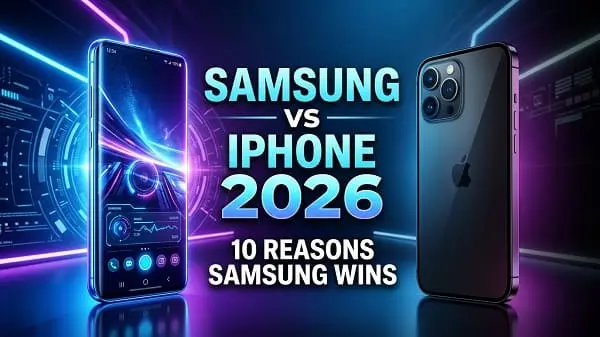
If you’re searching for 10 reasons why Samsung is better than iPhone 2026, you’re probably not looking for brand drama—you’re looking for practical advantages that actually affect daily use: multitasking, customization, charging, cameras, productivity, and how well your phone fits your work or study life. In 2026, iPhones are excellent devices, but Samsung has specific strengths that can make it the smarter choice for many people—especially power users and anyone who wants more control.
This article explains those strengths in a clear, real-world way. It’s written for buyers (and long-term users) who care about outcomes: what feels faster, what saves time, what helps you create content, and what makes your phone easier to live with.
Table of Contents
Value of This Article
This guide is designed to help you make a confident purchase decision—not just repeat the same talking points you’ve seen everywhere. You’ll get:
- 10 practical reasons Samsung can be better than iPhone in 2026, explained with real-life examples (study, work, content creation).
- Clear who each advantage is for (so you don’t pay for features you won’t use).
- A fair section on when iPhone still wins so you can choose based on priorities, not hype.
- Actionable buying tips to help you pick the right Samsung model (flagship vs mid-range vs foldable).
Before you buy: what “better” actually means in 2026
“Better” isn’t universal. It depends on your workflow and the devices you already own. In 2026, the biggest differences between Samsung and iPhone typically come from:
- How you work: multitasking, file handling, and external display workflows
- How you communicate: platform lock-in (iMessage/FaceTime vs cross-platform apps)
- How you create: camera flexibility vs consistent “point-and-shoot” results
- How you customize: control vs simplicity
With that in mind, here are the 10 reasons Samsung can be the better choice.
1) More choice: flagships, mid-range, and foldables
One of Samsung’s biggest advantages in 2026 is choice. Apple offers a focused lineup, while Samsung offers a wide range of devices that fit different budgets and lifestyles:
- Premium flagships for top performance, cameras, and display quality
- Strong mid-range models that often deliver excellent battery life and screens for the price
- Foldables for people who want a compact pocket phone (Flip) or a mini-tablet experience (Fold)
Why this matters: if you want the “best phone for you,” you need hardware variety. Samsung makes it easier to match your device to your use case—without forcing you into one form factor.
Who benefits most: students, commuters, multitaskers, and anyone who cares about screen size or foldable convenience.
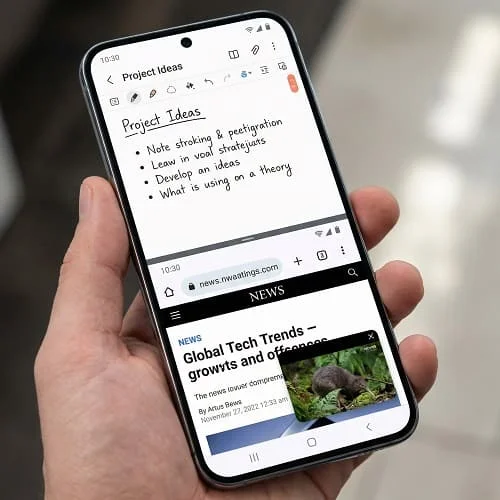
2) Multitasking that genuinely saves time
Samsung’s multitasking is one of the most practical daily-life reasons it can feel “better” than iPhone. Depending on your model and One UI version, you can use:
- Split-screen: two apps side by side
- Pop-up view: floating windows you can resize
- Drag-and-drop between apps (in supported apps)
- Persistent workflows: keep reference content open while you write or reply
Real examples:
- Student: lecture video + notes app + PDF reference without constant switching
- Work: email + document + chat app to move faster during busy days
- Creator: script notes + camera tools + reference links
This isn’t a “nice to have.” If you multitask daily, it’s a genuine productivity advantage.
3) Customization that improves comfort and productivity
Customization is often misunderstood as “changing icons.” In reality, Samsung customization can improve how fast you get things done and how comfortable your phone feels:
- Home screen and layout control: grid size, widget placement, app drawer behavior
- Notification control: fine-grained categories and behavior per app
- Default app flexibility: choose what you prefer (browser, call apps, messaging apps—varies by region and app)
- Routines/automation: change settings based on time, location, or device state
Why it matters: one person’s “perfect phone” is another person’s frustration. Samsung lets you shape the device around your habits rather than learning one rigid pattern.
Who benefits most: power users, people who do a lot of messaging/email, accessibility-focused users, and anyone who wants fewer taps per task.
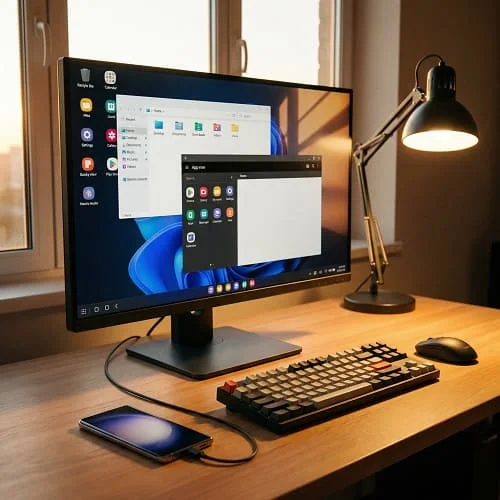
4) Samsung DeX: your phone can act like a computer
Samsung DeX is a standout feature in 2026. On supported models, it can provide a desktop-like interface when connected to an external display (or in certain setups). That means your phone can become a light productivity machine.
What DeX is useful for:
- Writing and editing documents with a keyboard
- Multi-window browsing like a desktop
- Remote work tools and productivity apps
- Presentations or classroom/project work (setup dependent)
Why it’s a real advantage: an iPhone is powerful, but iPhone workflows are not designed around a “phone as desktop” mode in the same way. If you like the idea of one device doing more roles, Samsung has a meaningful edge.
Official reference: Samsung DeX (official)
5) Better file management and “USB-C practicality”
If you handle files often—PDFs, downloads, lecture recordings, photos, videos, or work documents—Samsung’s file workflow can feel more like a computer:
- More familiar folder-based file management
- Easier handling of downloads and attachments
- Smoother external storage workflows (USB drives/SSDs, depending on model and app)
- USB-C accessory flexibility for many common use cases
Why students and professionals notice this: class materials and work documents are often shared as files, not just links. A phone that treats files naturally reduces friction.
Who benefits most: students, office workers, creators, anyone who frequently transfers files between phone and PC.
6) Faster charging options and battery protection controls
Battery experience is not just “how long it lasts.” It’s also:
- How quickly you can charge when you’re busy
- How hot the phone gets while charging
- How well the phone protects battery health over time
In 2026, Samsung often offers:
- Faster wired charging on many models (exact speed depends on model and charger)
- Battery protection features (charge limits / optimized charging options)
- More controllable performance/battery modes to match your needs
Real-world win: if you’re a heavy user, a 15–25 minute top-up can change your day. iPhones have improved charging, but Samsung typically gives more options across its lineup.
7) Camera flexibility (zoom, modes, pro controls)
In 2026, both iPhone and Samsung take excellent photos. The difference is often in flexibility and control.
Samsung advantages commonly include:
- More zoom flexibility on specific models
- More camera modes for different scenarios
- Manual/pro controls more accessible for users who want them
Who benefits most:
- Travel photography (zoom and versatility)
- Events and concerts (distance shooting)
- Creators who want manual tweaks and multiple shooting styles
Honest note: iPhone is often praised for consistent video workflows and reliability in “just shoot” scenarios. But if you want more ways to get the shot, Samsung’s approach can be a major advantage.
8) Display variety and outdoor usability
Apple and Samsung both make great displays, but Samsung’s advantage is typically:
- Variety: sizes, shapes, and foldable options
- Outdoor usability: strong brightness modes on many models
- User control: more options to tune how the screen feels
If you read a lot (PDFs, textbooks, articles) or use your phone outdoors for navigation, brightness and comfort are not minor details—they affect daily usability.
9) Android freedom: defaults, permissions, and workarounds
Samsung runs Android with One UI, and that gives you a kind of flexibility that many users value in 2026:
- More freedom to choose default apps and preferred workflows
- More granular control over permissions and background behavior
- More workarounds when something doesn’t fit your needs (launchers, widgets, automation)
- A wide ecosystem of accessories and third-party solutions
Why this matters: iPhone tends to prioritize a controlled experience. That’s great for simplicity—but if you frequently think “I wish I could do it my way,” Samsung is often the better fit.
10) Strong security options for business and advanced users
Security is not only about marketing—it’s about whether a platform offers the controls your situation requires. Samsung is widely known for enterprise-grade security tooling and device management options, which can be relevant even to some students and professionals (especially those using work profiles or secured apps).
Examples of what advanced users and organizations care about:
- Device protection features designed for business environments
- Management options for work profiles and secured apps
- Security platform transparency and policy controls (varies by region and model)
Official reference: Samsung Knox (official)
Who should choose Samsung in 2026?
Samsung is often the better choice if you match one or more of these profiles:
- Power users who multitask, customize, and want more control over the device
- Students who benefit from split-screen learning, note-taking workflows, and file handling
- Creators who want camera flexibility, zoom options, and better file workflows
- Windows users who prefer flexible cross-platform workflows
- Early adopters who want foldables and new form factors
When iPhone might still be the better choice (honest section)
To keep this comparison useful and fair, here are common cases where iPhone may be the smarter pick:
- You’re deep in Apple’s ecosystem (Mac, iPad, Apple Watch) and want maximum “everything works together” convenience.
- Your family/friends rely on iMessage/FaceTime and that matters in your region.
- You want simplicity and prefer fewer customization choices.
- You upgrade often and care strongly about resale value (market-dependent).
The best phone isn’t the one with the longest list of features—it’s the one that fits your life with the least friction.
Quick comparison table (Samsung vs iPhone)
| Category | Samsung (often better for) | iPhone (often better for) |
|---|---|---|
| Device choice | Variety + foldables | Simple lineup |
| Multitasking | Split screen + pop-up windows | More limited on iPhone |
| Customization | Deep UI and workflow control | Controlled, consistent defaults |
| Productivity extras | DeX, S Pen on supported models | Apple ecosystem continuity |
| Cameras | Flexibility (zoom/modes) | Consistency and video workflow |
| Charging | Often faster wired options | Solid, improving |
| Files | Computer-like file handling | Simple, more controlled |
Buying tips: how to pick the right Samsung model
Many “Samsung vs iPhone” arguments are misleading because people compare:
- A brand-new iPhone Pro to a mid-range Samsung, or
- An older iPhone to a flagship Samsung Ultra
In 2026, choose Samsung based on your needs:
- If you want the best cameras + productivity: look at Samsung’s top-tier flagship line.
- If you want value and battery life: Samsung’s mid-range devices can be excellent.
- If you want a new lifestyle device: consider a foldable (but be realistic about durability and cost).
Technician tip: Don’t underestimate storage. If you shoot lots of video or keep many apps, pick enough storage so your phone doesn’t slow down over time.
Related guide: full iPhone vs Samsung comparison
If you want a balanced, category-by-category breakdown (including where iPhone wins), read this companion article:
iPhone vs Samsung: Which Is Better in 2026?
FAQ
Is Samsung really better than iPhone in 2026?
Samsung can be better if you value multitasking, customization, device variety (including foldables), DeX, and flexible file workflows. iPhone can be better if you prioritize Apple ecosystem convenience and simplicity.
Which is better for students?
Many students prefer Samsung for split-screen study workflows, easier file handling, and note-taking options (especially on models that support pen input). iPhone is great if your school workflow is built around Apple devices.
Which is better for content creators?
Both can be excellent. Samsung often wins on flexibility (zoom and modes), while iPhone is often praised for consistent video workflows. Your “best” depends on what and how you shoot.
Does Samsung have good security?
Yes. Samsung provides strong security and enterprise options (model/region-dependent). Knox is the best-known official security platform reference.
Should I switch from iPhone to Samsung?
Switching is worth it if iPhone limitations affect you daily (multitasking, file workflows, customization). If you’re deeply invested in Apple services and devices, switching can feel like losing convenience.
Final checklist
- Write your top 3 priorities (multitasking, camera style, battery/charging, ecosystem).
- If you multitask daily, Samsung’s split-screen and pop-up windows can be a major win.
- If you want a phone that can act like a desktop sometimes, choose a DeX-capable model.
- If you handle files often, Samsung’s file workflow may feel more natural.
- If you rely on Apple ecosystem features daily, weigh the convenience cost of switching.
In 2026, the debate between Samsung and iPhone ultimately comes down to one thing: choice and control. Samsung offers more customization, more variety, and more flexibility. If those features matter to you, Samsung can easily be the better smartphone.

About the Author
Alex Carter — Founder & Editor‑in‑Chief, GicraMobile
Alex leads GicraMobile’s testing lab and reviews. His methodology focuses on day‑to‑day performance, battery health and thermals, camera consistency, and 5G/LTE reliability—so you can pick the right phone without hype.
Real‑world testing: 90–120 Hz smoothness, idle drain, thermals
Camera checks: HDR, skin tones, low‑light stabilization
Connectivity: band fit, eSIM, VoLTE/VoWiFi, Wi‑Fi performance
You may also like this